The Duplicating a Recurrence feature allows you to create a copy of an existing recurrence, with options to include or exclude the associated order templates.
Steps to Duplicate a Recurrence
Open the recurrence you want to duplicate.
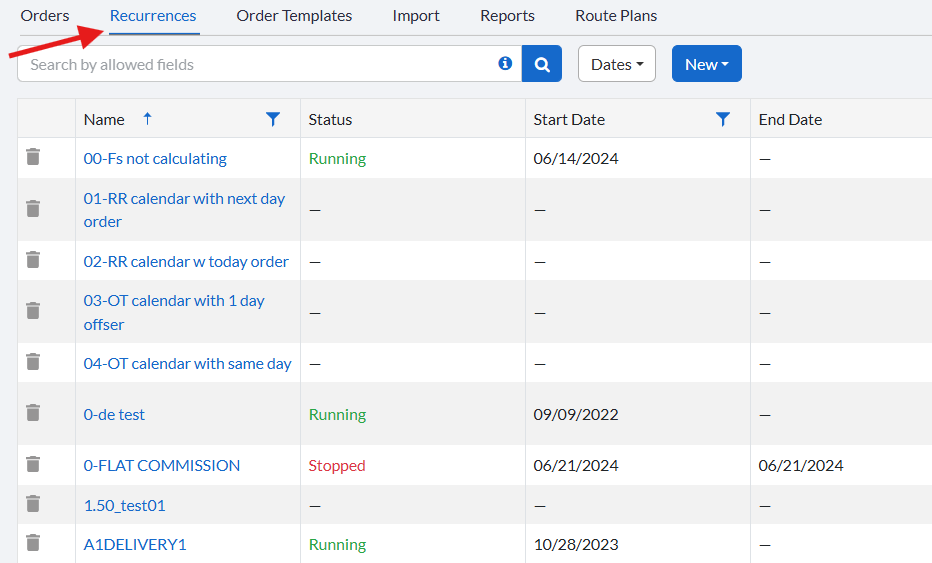
Click the dropdown beside Save to open the menu.
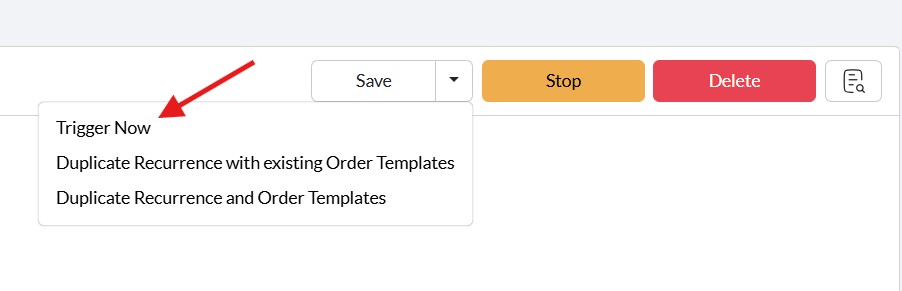
Choose one of the following options:
Duplicate Recurrence with existing Order Templates – creates a copy of the recurrence using the existing templates.
Duplicate Recurrence and Order Templates – creates a copy of the recurrence along with new copies of the order templates.
Notes
If the original recurrence is in Running state, the duplicated recurrence will also be in Running state.
If the original recurrence is in Stopped state, the duplicated recurrence will also be Stopped.
Related Articles
- Recurring Orders Overview
- Start a Recurrence
- Trigger a Recurrence
- Delete a Recurrence
- Order Template Views
- Audit a Recurrence
Was this article helpful?
That’s Great!
Thank you for your feedback
Sorry! We couldn't be helpful
Thank you for your feedback
Feedback sent
We appreciate your effort and will try to fix the article