Once order templates are added to a recurrence, you can view them in three different ways to better understand and manage your orders.
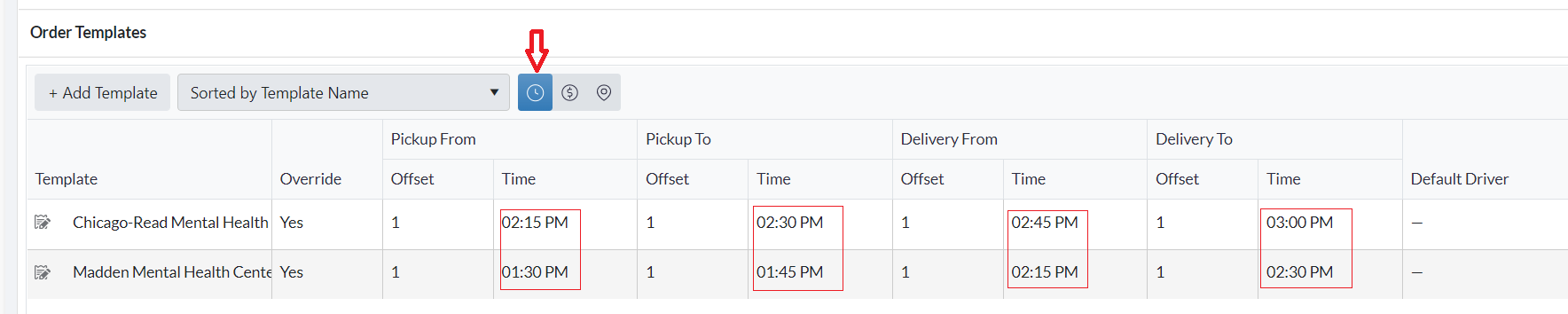
1. Time View
Displays the order templates based on their pickup and delivery time windows.
Useful for quickly checking when orders are scheduled to be picked up and delivered.
Helps in planning driver schedules and ensuring timely order fulfillment.
2. Rates View
Displays the order templates based on pricing details, including delivery charges, extra charges, and other cost-related information.
Useful for reviewing the financial aspect of orders.
Helps in identifying orders with high additional fees or special charges.

3. Address View
Displays the order templates based on their pickup and delivery addresses.
Useful for quickly verifying locations and ensuring accurate delivery routing.
Helps in confirming that the correct addresses are associated with each order, minimizing errors.

Tip: You can switch between these views at any time to gain different perspectives on your orders and make more informed decisions.
Related Recurrence Articles
- Recurring Orders Overview
- Start a Recurrence
- Trigger a Recurrence
- Duplicate a Recurrence
- Delete a Recurrence
- Order Template View
Was this article helpful?
That’s Great!
Thank you for your feedback
Sorry! We couldn't be helpful
Thank you for your feedback
Feedback sent
We appreciate your effort and will try to fix the article