⚠️ Important Things to Know About This Release
Table Of Contents
Table Of Contents
- Back Office
- Accounts
- Orders
- Billing Accounts (“Bill To” Orders)
- Driver Settlements
- Dynamic Views
- Administration
- Copy Extra Fee Schedules
- Download Template & Zone Files For ZIP Pricing Zones
- Price List Page: Stay On The Page After Saving
- Redesigned User Record: Personal Information & Workforce Details
- Restrict Internal User Access By Company
- Configuration of Self-Serve Notice Banners
- Driver-Only Attribute Restrictions
- Removed The OrderPickupLate And OrderDeliveryLate Event Types
- Dispatch Board
- Self-Serve Portal
- Public Tracking Page
- Tenant API
- Integration API
- OData
New Features In This Release
The release notes refer to different sections of the application. You can consult their definitions below:
Definitions (Click To Expand)
- Back Office
- Where Customer Service Representatives (CSR) create and edit orders, create accounts, review drivers, etc.
- Dispatch Board
- Where Dispatchers assign orders to drivers, get notifications for invalid orders, etc.
- Auto-Dispatch
- This section refers to the automated order assignment setup and its process.
- Administration
- This section is in the Back Office but refers to sections only an administrator will use like Settings and Pricing.
- Customer Portal
- Where account users log in to create orders, view their order history, enter a credit card, etc.
- Tracking Site
- Where customers enter a tracking number like the order ID or a reference number to view the status of their order.
- OData
- Data fields and variables saved in OData.
- Account API
- API provided to your accounts to create, update and get orders. For documentation, see api.dispatchscience.com.
- Tenant API
- API provided to you to create orders for your accounts, retrieve invoices and change invoice status. For documentation, see api.dispatchscience.com.
Back Office
Accounts
Archive / Unarchive Accounts
Accounts can now be archived and unarchived instead of only blocked, giving you a real way to retire an account without losing its history. An archived account is filtered out of account search when creating a new order, changing an order's account, or adding accounts to a master account or route plan, and its users and contacts can no longer log in to the portal or call the API (invalid credentials / 401 Unauthorized), though they and the account details remain editable internally. Archived accounts are also clearly flagged as such on the account list and account details screens, with a permission-driven Archive/Unarchive action.
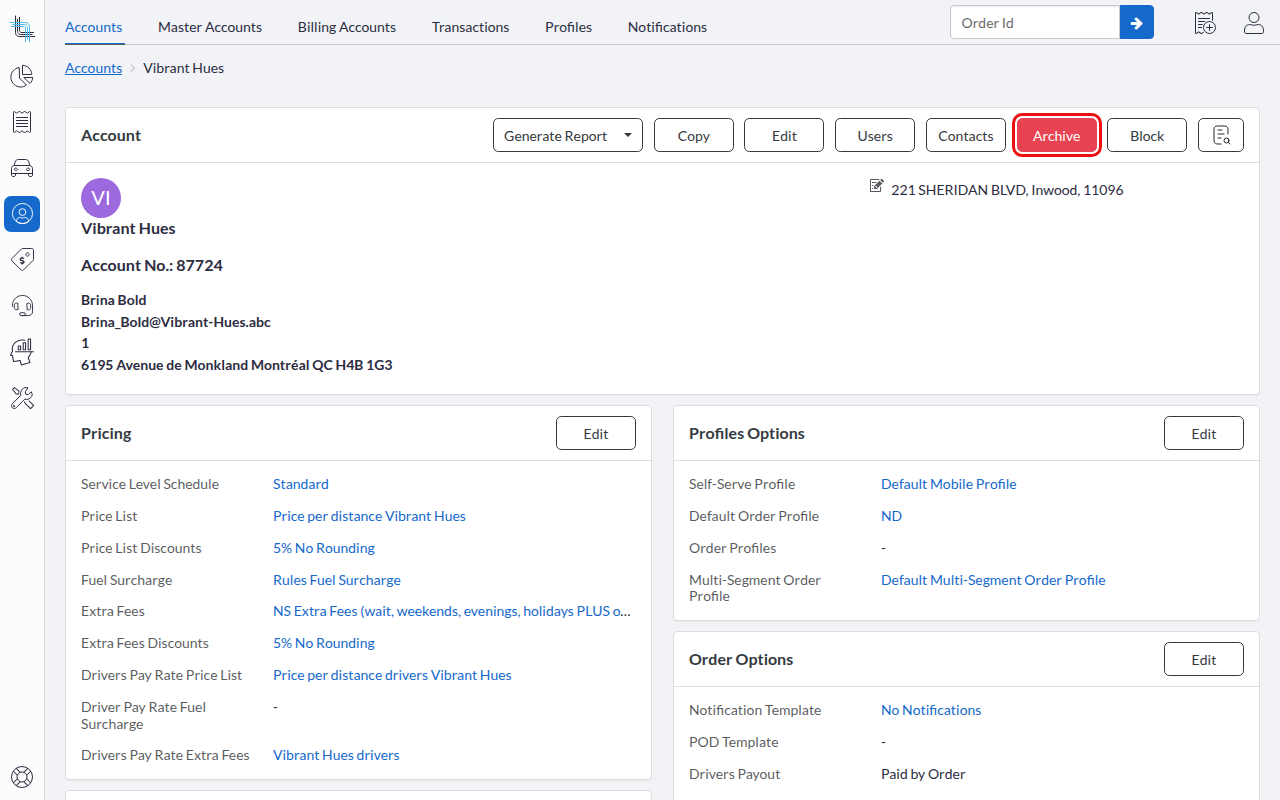
For more details, refer to the user guide.
New Permission: Accounts – Block/Unblock
Blocking and unblocking an account is now controlled by its own permission, which can be granted to any internal user individually instead of being tied invisibly to the Admin role.
Visual Update In Stripe (Credit Card)
For users having access to Stripe's Transactions screens, you may notice small visual differences in the way transactions are displayed. This is a visual change only: saving, updating, pre-authorizations and payments in Dispatch Science all continue to work exactly as before.
Orders
Saved Views On The Order List
Back-office users can now create and save named views on the Order List, capturing filters, column visibility/order/width, sort and page size. A per-view Autosave toggle lets a working list keep updating automatically as you tweak it, while curated named views stay under manual control. Views also stay in sync across browser tabs, so changes made in one tab are reflected everywhere instead of silently being overwritten.
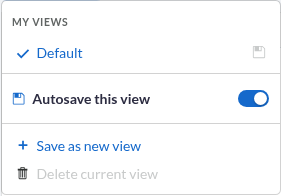
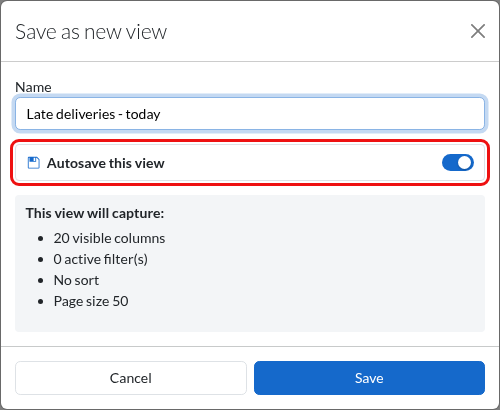
For more details, refer to the user guide.
Order Creation & Account Page Readability Improvements
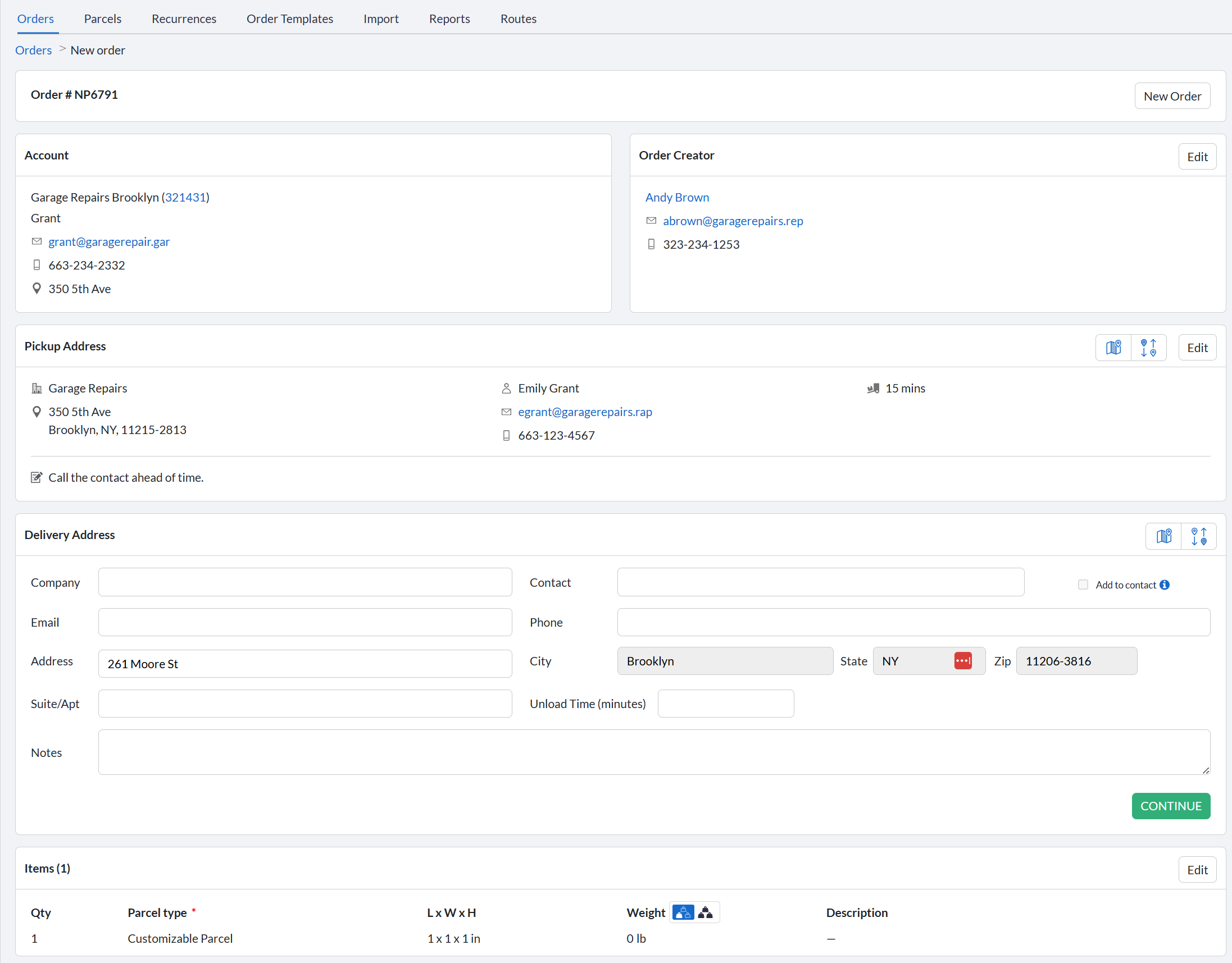
The order creation/edit page has been reworked for readability: notes are now truncated to two lines with a "show more" popup for the full text (unified between Customer and Internal notes), small icons replace the red dots for email, phone number and address, contact names are clickable to open the related user, and each block now has a clearer header so it's obvious which party (customer, contact, driver) the information belongs to. Pickup and Delivery Address blocks get the same icon treatment, plus a company icon when one is set, in both the Back Office and the Self-Serve Portal. The Account screen's notes get the same truncation treatment.
Order Rules Re-Evaluated On Attribute & User Field Changes
Order rules that look at the order's attributes or user field values are now re-evaluated while the order or order template is still being created: changing an attribute or a user field value re-runs them immediately, instead of only once the order exists. Attributes checked manually, or added automatically by the selected account or contact, all trigger the re-evaluation. This ensures the right order profile — with its own required fields — is applied before the user finishes creating the order. Order item user fields now follow the order profile change as well, alongside the reference numbers, order user fields and workflows.
This changes when the rules run, not what they can be built on: attributes and user fields are not new criteria in the order rule editor, and its field list is unchanged. Rules that evaluate attributes or user fields are script-based rules, as before.
Note: if a user field triggers a change to a different order profile and that profile doesn't have the same user field configured, that field's value is lost. Review your profiles' user fields before setting up these triggers.
Exceptions
The Damaged exception icon now shows on an order item whenever a Damaged exception code is applied, whether it was added by the driver while scanning or entered manually in the Back Office or driver app. Previously, the icon only appeared for exceptions added through scanning.
Billing Accounts (“Bill To” Orders)
Create An Order Billed To Another Account
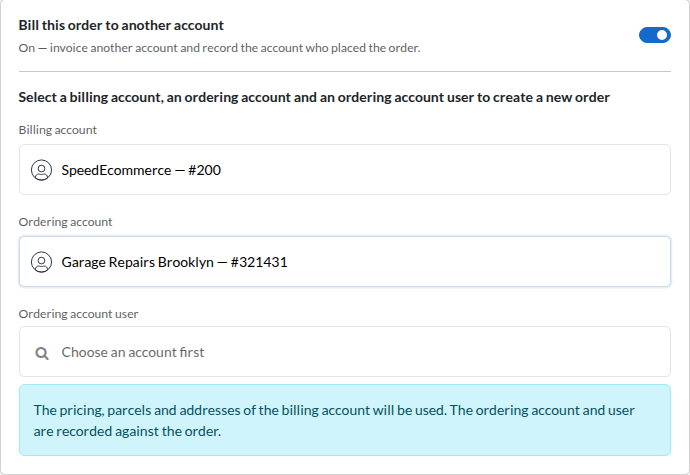
The new Billing Accounts section, in the Accounts area alongside Master Accounts, lets one account be invoiced for orders placed by others — something Master Accounts cannot do, since an account can belong to only one Master Account. A Billing Account identifies the account to be invoiced and its associated accounts, whose users can then place orders billed to it; removing an account revokes access immediately, without affecting existing orders.
With the required permission, back-office users enable Bill this order to another account at order creation and pick a Billing Account, an Ordering Account and an Ordering Account User; self-serve users go through New Order for a Billing Account. The order uses the billing account's pricing, parcel types and addresses, while the ordering account and user are recorded on the order and available as new columns in the order list and My Orders.
For more details, refer to the user guide.
New Invoice Separation Option: Ordering Account
Invoices can now be separated/grouped by the account that placed the order, rather than only by the billing account.
New “Ordering Account” Field On Order Rules
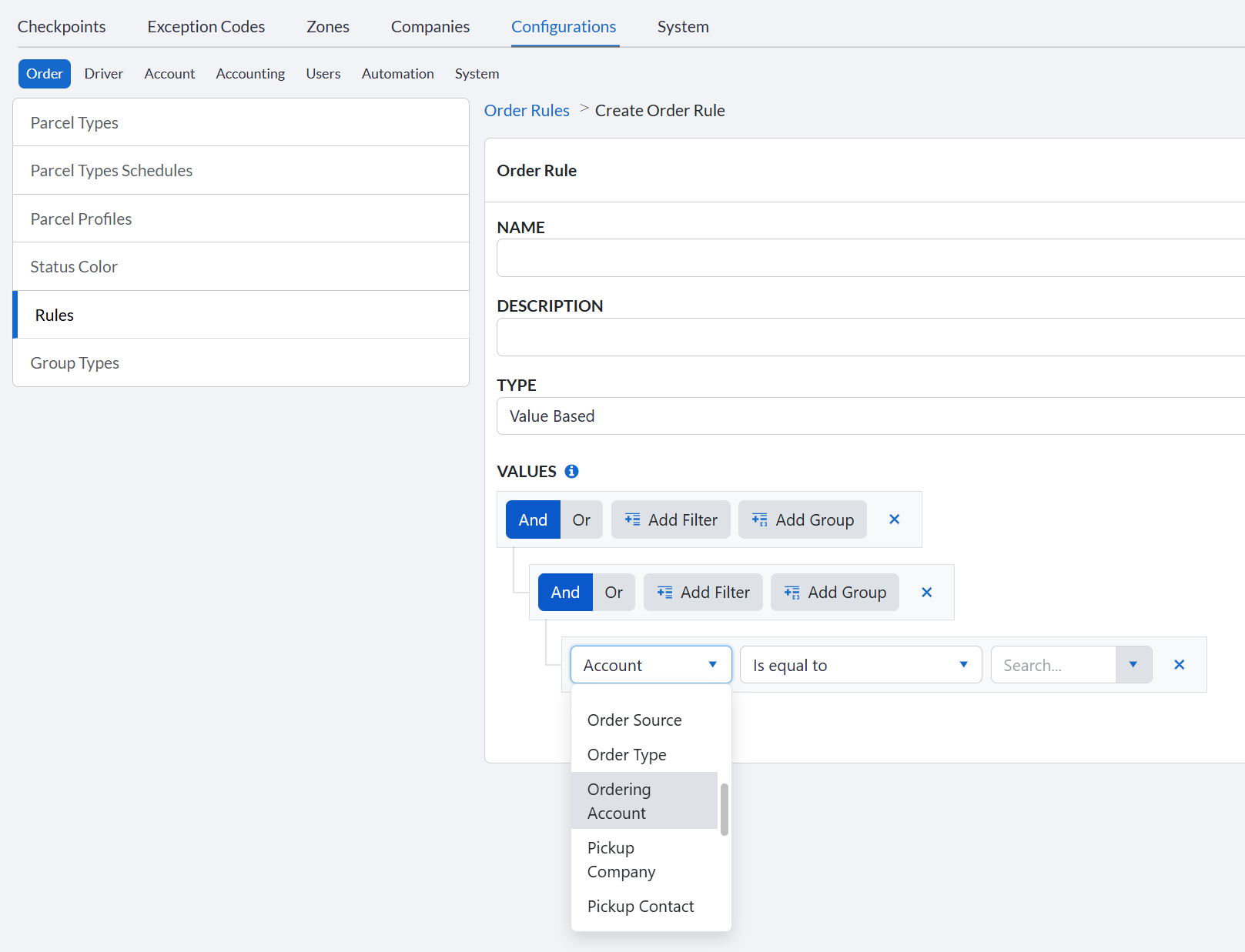
Order Rules, and everything they gate (Order Update scripts, Extra Fee scripts, notifications, order groups, order templates, order subscriptions), now offer a new Ordering Account field alongside the existing Account field. On a “Bill To” order, Account keeps resolving to the billed account exactly as it always has, while Ordering Account resolves to the account that actually placed the order (it stays empty, and never matches, on a standard order). Scripts also get the ordering account exposed as a new value alongside the existing account data, so operational automation, like an Order Update script that adds hubs, can be scoped to the account placing the order instead of automatically running for every account billed through it.
Driver Settlements
Fuel Surcharge Recalculation Date
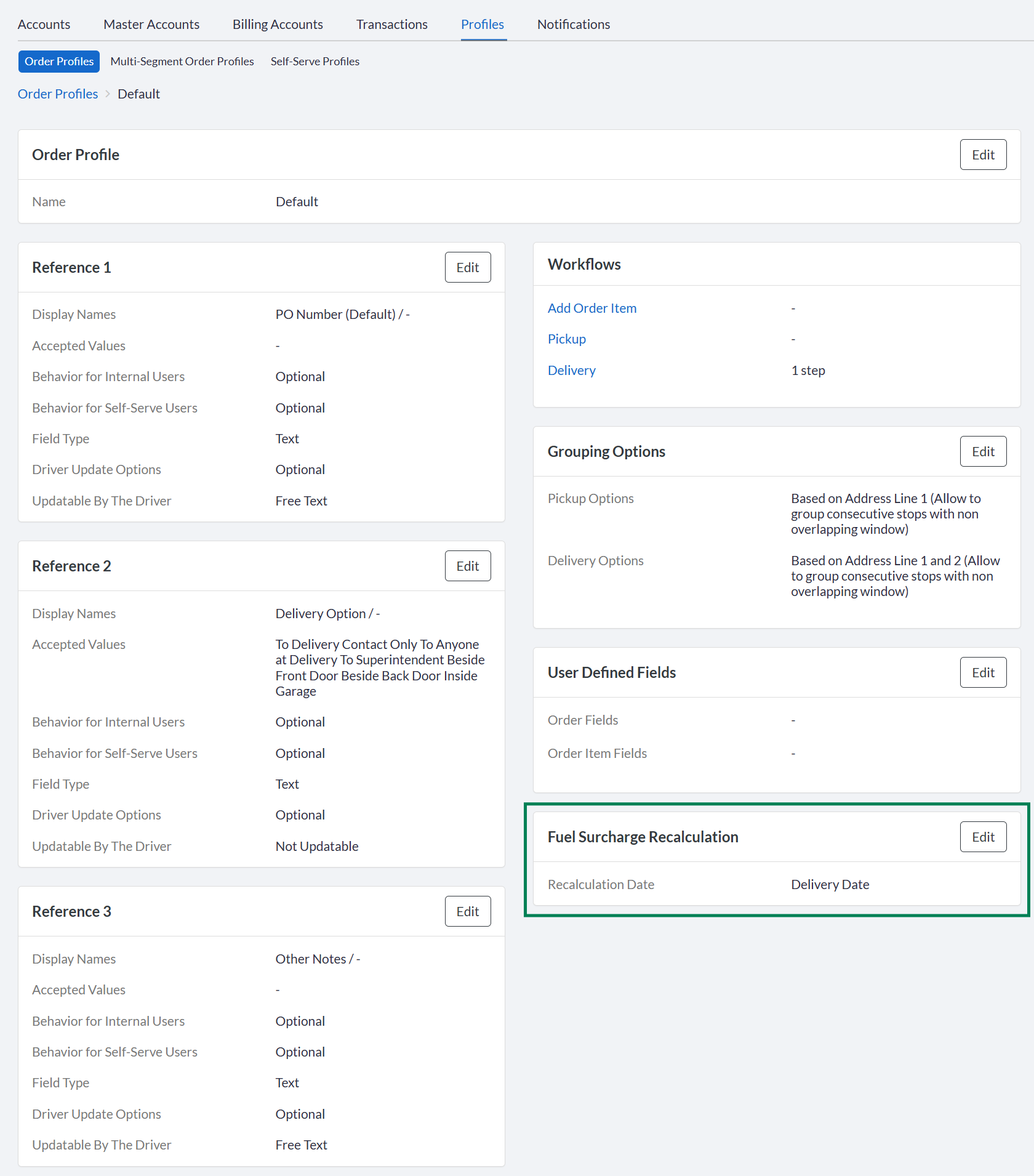
A new Fuel Surcharge Recalculation setting on the account's Order Profile controls which date the platform uses when it automatically recalculates the fuel surcharge (on order creation, order updates, and status changes): Creation date, Ready At date, Pickup date, or Delivery date. Previously, the surcharge always used the current date, so something as small as saving a note could shift it to a different week's rate than the one in effect when the order was originally priced.
Percentage Deductions & Additions On Negative Commissions
On a driver settlement with a negative total order commission, percentage-based deductions and additions now calculate to $0 instead of flipping the sign (deductions showing as positive, additions as negative). This applies both in the UI and via the API.
Dynamic Views
Row Actions On Dynamic Views
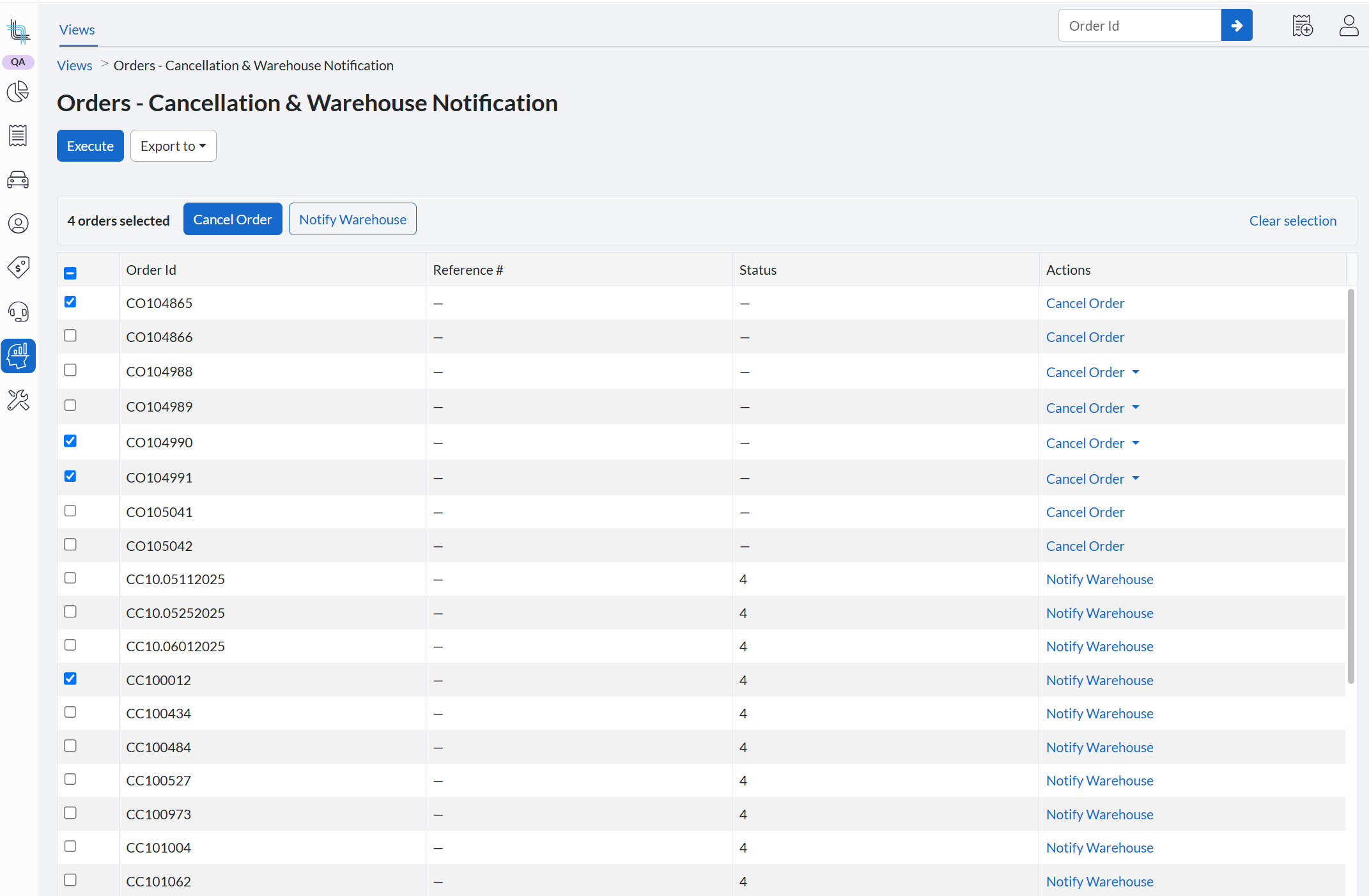
Dynamic Views now support a new Actions column, so a row can trigger an action directly from the grid instead of only displaying data or a hyperlink. Two types of actions are available: DataBridge actions, which push a row into an existing integration without hand-building a URL, and a new Cancel Order action, which opens the platform's existing cancellation confirmation modal so an order can be cancelled in place with the same safeguard as everywhere else in the app. Which actions a user sees depends on their permissions and, for Cancel Order, on whether that specific order can actually be cancelled. More row actions are planned for a future release, so stay tuned!
Batch Actions On Dynamic Views
Both actions above can now be run in batch: select multiple rows using the new row checkboxes (shown only where a batch-capable action applies), then apply an action to the whole selection from a bulk action bar. Once a batch completes, you get a clear summary of which rows succeeded, failed, or were skipped: shown as a toast for DataBridge actions, and by email once processing finishes for system actions like Cancel Order.
Administration
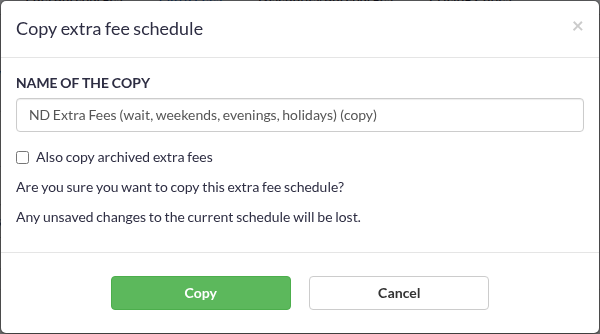
Copy Extra Fee Schedules
Extra Fee Schedules can now be copied instead of rebuilt from scratch, which is useful if you refresh rate cards on a recurring basis: copy an existing schedule, rename it, and adjust only what changed.
For more details, refer to the user guide.
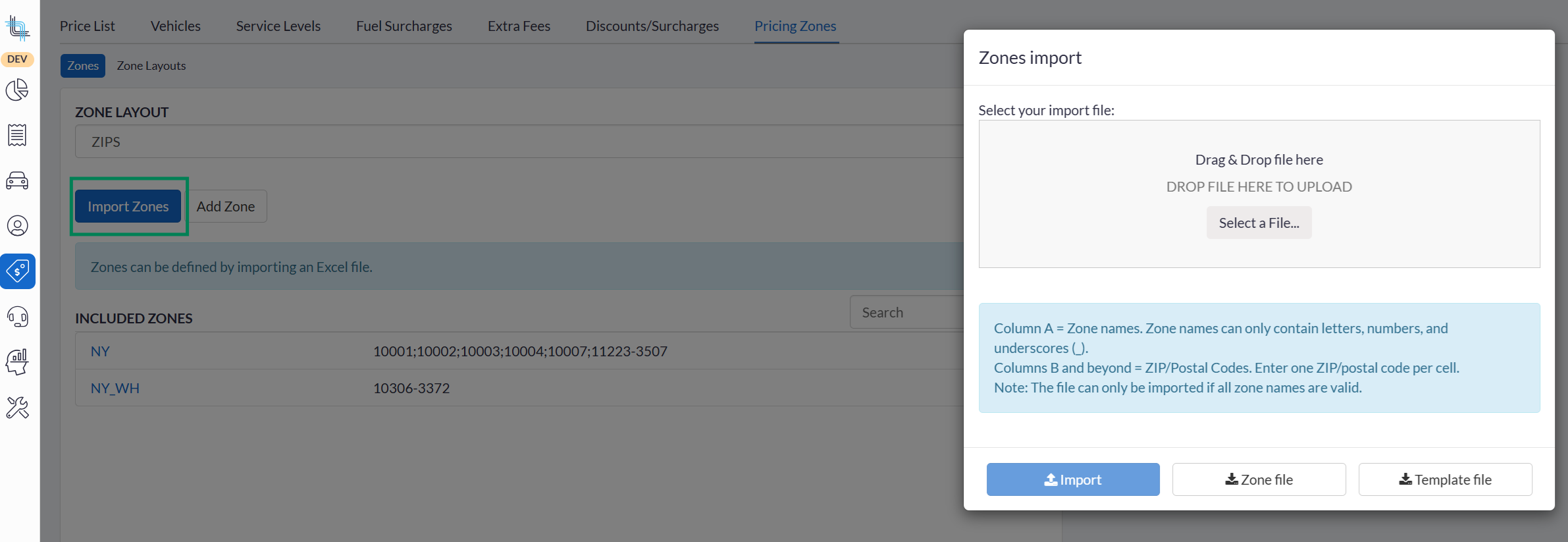
Download Template & Zone Files For ZIP Pricing Zones
You can now download a template file and the current zone file directly from Import Zones, matching the pattern already used for route plan schedule imports. A warning is shown before an import replaces existing zones.
Price List Page: Stay On The Page After Saving
Saving a price list or uploading its pricing file no longer redirects you back to the Price List grid; you stay on the page to keep working.
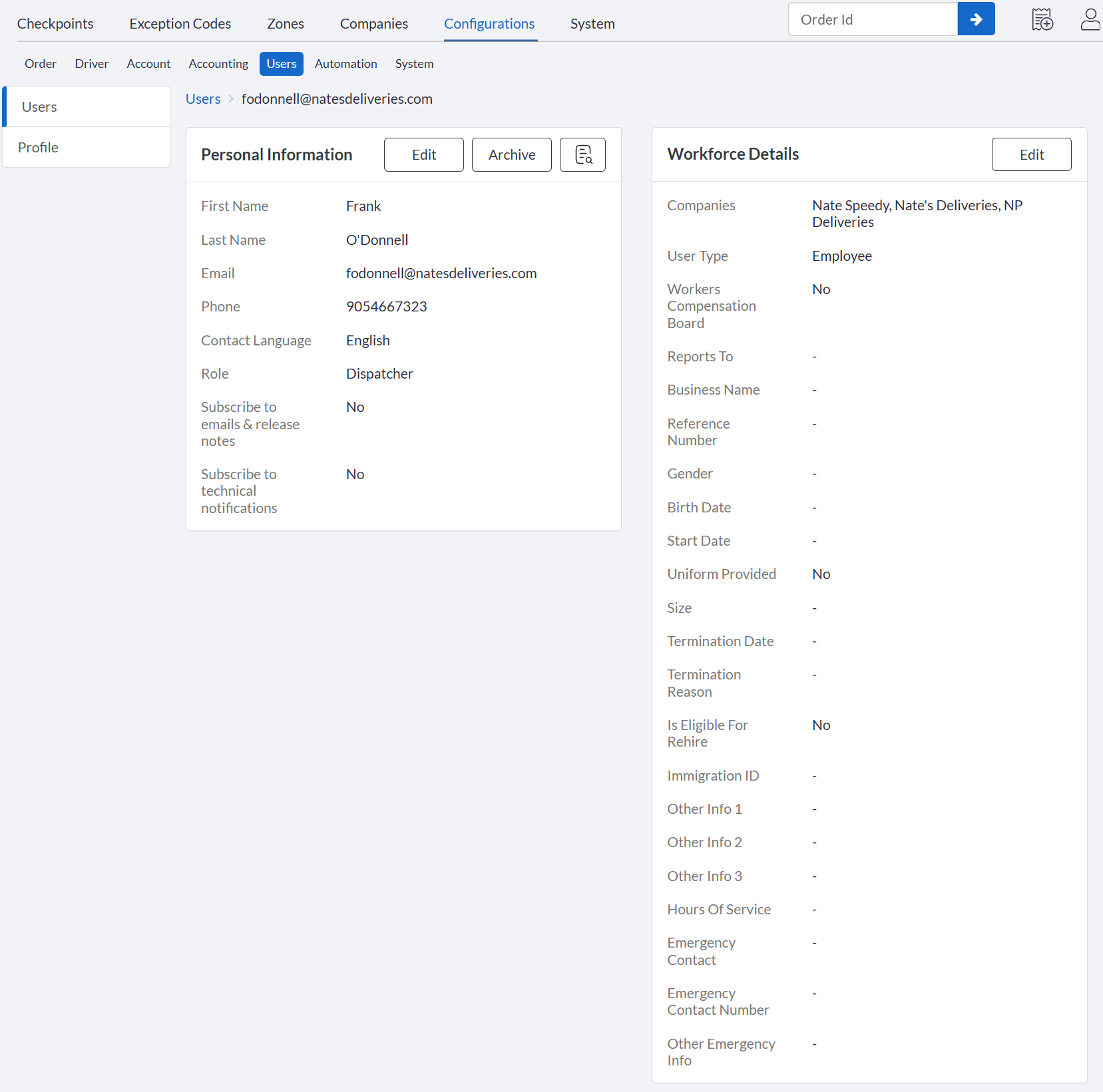
Redesigned User Record: Personal Information & Workforce Details
Opening an internal user's record now shows two independent, read-only sections: Personal Information and Workforce Details, each edited on its own screen instead of one long edit form.
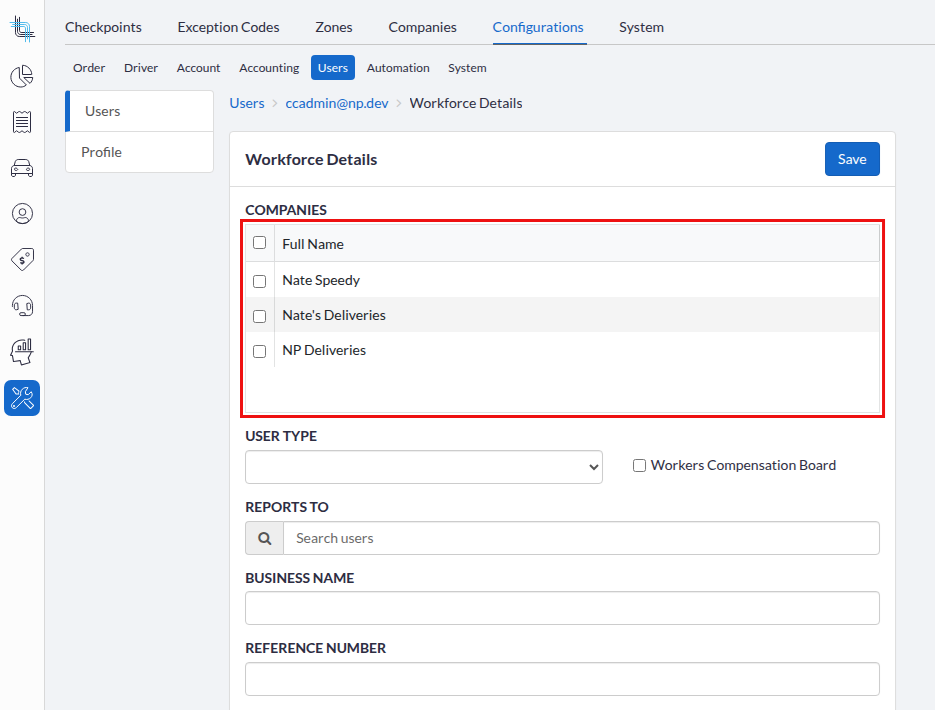
Restrict Internal User Access By Company
When one or more companies are assigned to an internal user (from the Workforce Details section above), that user's access to accounts and orders (on both list and detail screens, in the UI and the API) is now filtered to just those companies.
For more details, refer to the user guide.
Configuration of Self-Serve Notice Banners
Companies can now create their own notice banners for their self-serve users, configured from the Back Office at the company level. A new permission controls who can view/edit banners on a company, and a new screen lists the banners created for it. When more than one banner applies to a self-serve user at once, they're shown in a carousel, critical banners first and newest first, and dismissible banners can still be dismissed one at a time.
For more details, refer to the user guide.
Driver-Only Attribute Restrictions
A new option lets you restrict dispatch based on the driver's attributes alone, independently of the order's attributes, useful for flagging drivers who aren't fully onboarded yet and shouldn't receive certain orders regardless of what the order requires.
For more details, refer to the user guide.
Removed The OrderPickupLate And OrderDeliveryLate Event Types
These duplicated the existing PickupLate and DeliveryLate event types and have been removed. If you have subscriptions or integrations referencing OrderPickupLate or OrderDeliveryLate, please update them to use PickupLate / DeliveryLate instead.
Dispatch Board
AutoDispatch Capacity Filter Change
The AutoDispatch capacity filter no longer excludes a driver just because they don't have enough capacity right now: drivers who could complete a delivery first and then pick up the order are now considered.
Driver Stop List
On the driver stop list, the yellow highlight on multi-segment order addresses (a leftover visual cue) has been removed and replaced with a dedicated segment icon next to the order ID, consistent with the Order List.
Routes & Attribute-Based Dispatch Restrictions
Attribute-based dispatch rules now also apply when moving an order into a route, not only when dispatching on demand: dispatch can be prevented (or allowed with a warning) if the order's attributes don't match the assigned driver's.
Self-Serve Portal
“Bill To” Orders For Self-Serve Users
Self-serve users with access to a Billing Account can now place an order billed to it, from a new "New Order For A Billing Account" option next to the regular New Order button (on the Order List, the dashboard, and the top menu). They pick the Billing Account and the Ordering Account they're placing the order for (both are pre-filled and locked when there's only one option), and the order uses that billing account's pricing, parcel types and addresses. Placing a Bill To order now depends only on the ordering account being on the Billing Account's associated accounts list, not on also having separate access to the Billing Account itself, and My Orders and order details now agree on which Bill To orders a user can see, whichever side of the order (the Billing Account or the Ordering Account) is theirs. My Orders also gets a new Ordering Account column so these orders are easy to find.
See Back Office > Billing Accounts above for how Billing Accounts are set up.
Public Tracking Page
The public tracking page now fully supports multi-segment orders: the map and remaining-stop count display for the order as a whole, while individual segments stay excluded from public tracking so only the full multi-segment order can be looked up.
For more details, refer to the user guide.
Tenant API
Order Update Script Now Runs On The Quote Endpoint
The Quote endpoint on the Tenant API now runs the tenant's Order Update Script, so quoted prices reflect the same pricing logic as regular order creation.
Get Driver Returns Settlement IDs
The Get Driver endpoint now returns SettlementCycleId and SettlementTemplateId in addition to their names, so both can be reused directly in other API calls.
Cancel Multiple Orders In A Single Call
Cancel Order now supports cancelling multiple orders in a single call (processed internally in batches), instead of requiring one call per order, reducing the concurrency issues that could occur when cancelling several orders from the same route one at a time. Cancelling a multi-segment order automatically cancels its segments in the same operation.
PATCH Requests Now Show The Full Body Model
The Tenant API and the Integration API now show the full body model of a PATCH request (not just a request template), so it's clear which properties can actually be updated.
Ignore History Addresses When Geocoding
Geocoding done through the Tenant API and the Integration API can now be configured to only match against Global addresses, ignoring History addresses, until Contact and Hub addresses are also included in Azure Search; when enabled, results are sorted Global first, then Contact, then Hub.
Integration API
New Endpoint: List Subscribable Events
A new endpoint lists all events available for a given entity type (Account, RoutePlan, Company, Tenant) so you can discover what's subscribable without guessing: GET /api/v1/subscriptions/available-events/{entityType}. This also applies to the Tenant API.
Additional Properties On Account Endpoints
The account endpoints (GET, POST, PATCH /api/v1/accounts) now expose additional account properties that were previously missing or inconsistent between the three endpoints.
OData
DriverPayout OData Endpoint Removal
The DriverPayout OData endpoint will be removed. Please switch to the OrderPayoutDriverDetails endpoint.
OData Authentication Migrated To Entra ID
OData authentication has been migrated off legacy super-admin accounts to Entra ID / Basic Auth. If any of your integrations authenticate via a super-admin account, please confirm your OData access still works.
Was this article helpful?
That’s Great!
Thank you for your feedback
Sorry! We couldn't be helpful
Thank you for your feedback
Feedback sent
We appreciate your effort and will try to fix the article