This article explains how to configure a Parcel Type with customizable dimensions, weight calculations, and unit factors, and how these settings impact order creation and fee calculations.
Customizable Parcel Types
Setting a Parcel Type as Customizable allows users to modify its dimensions when creating or editing an order.
Dimensions
Select the unit of length based on your system measurement:
Imperial: inches or feet
Metric: centimeters or meters
Enter the Length, Width, and Height of the parcel.
These dimensions are used for dimensional weight calculations when enabled.
Dimensional Weight
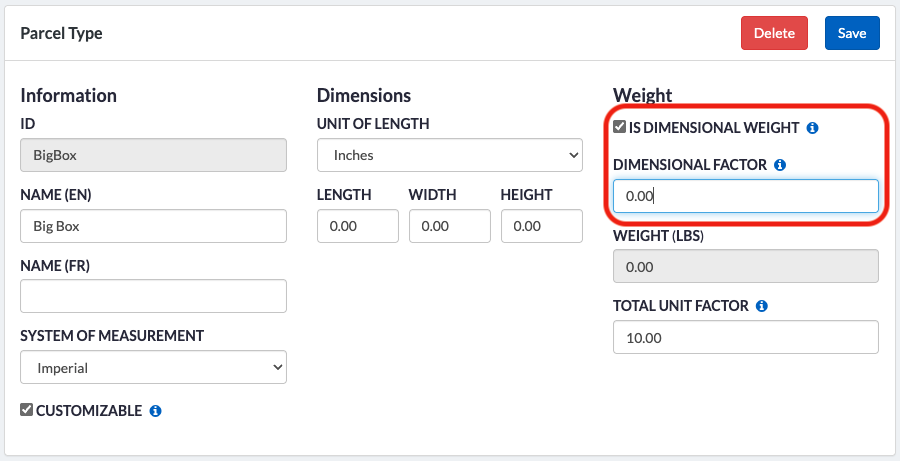
You can configure a Parcel Type to calculate weight using dimensional (DIM) weight, which determines a minimum billable weight based on the parcel’s size rather than its actual weight.
How Dimensional Weight Is Calculated
When enabled, dimensional weight is calculated using the following formula:
(Length × Width × Height) ÷ Dimensional Factor
The resulting value is used as the minimum weight for the Parcel Type when it is selected in an order.
Dimensional Factors
Dimensional factors vary by carrier and shipment type. Below are commonly used examples.
Imperial System
139 in³/lb (12 lb/ft³)
166 in³/lb (10.4 lb/ft³) – commonly used for IATA / air shipments
194 in³/lb (8.9 lb/ft³) – commonly used for domestic shipments
Metric System
5000 cm³/kg (200 kg/m³)
6000 cm³/kg (166.67 kg/m³)
Configuring Dimensional Weight
When Dimensional Weight is selected, the Dimensional Factor field becomes available.
Enter the dimensional factor using the system’s measurement units:
Weight unit: lb or kg
Dimension unit: cubic length (in³ or cm³)
The system will automatically calculate and apply the dimensional weight as the parcel’s minimum weight when the Parcel Type is used in an order.
Optional Weight (Dimensional Weight Disabled)
If Dimensional Weight is not selected, you may enter an optional fixed weight for the Parcel Type.
This weight can still be adjusted when creating or editing an order.
Weight Used for Extra Fee Calculations
In all cases, the weight can be modified at the order level. The system will use the greater of:
The calculated minimum dimensional weight (if dimensional weight is enabled), or
The weight entered during order creation or editing
This value is used to calculate the Total Weight extra fee.
Total Unit Factor
The Total Unit Factor defines how a Parcel Type contributes to the Number of Pieces extra fee.
How It Works
1.0 – Each parcel counts as 1 unit
0.5 – Two parcels are required to count as 1 unit
This allows you to assign relative weight or importance to different parcel sizes.
Example
A letter or a 10 × 10 × 10 in box may count as 1 unit
A 45 × 25 × 60 in box may count as 2 units
If you do not charge a Number of Pieces extra fee, set this value to 1.
Summary
Configuring Parcel Types with customizable dimensions, dimensional weight, and unit factors provides flexibility in how parcels are billed and how fees are calculated. These settings ensure accurate weight calculations and allow you to align pricing with parcel size and shipment requirements.
Was this article helpful?
That’s Great!
Thank you for your feedback
Sorry! We couldn't be helpful
Thank you for your feedback
Feedback sent
We appreciate your effort and will try to fix the article